Unlocking the Power of Dedicated Servers: Which Plan Fits Your Project?
Choosing a dedicated server can feel like wandering into a high-tech supermarket without a shopping list. You see racks of shiny processors, endless rows of RAM, and storage options that make your head spin. So, where do you start? Should you pick a budget-friendly plan or splurge for maximum performance? Let’s walk through the options, compare them geographically, and figure out which server really fits your needs—whether you’re running a small web project, a bustling e-commerce store, or experimenting with data-heavy applications in the United States.
Understanding Dedicated Server Plans: What’s on the Menu?
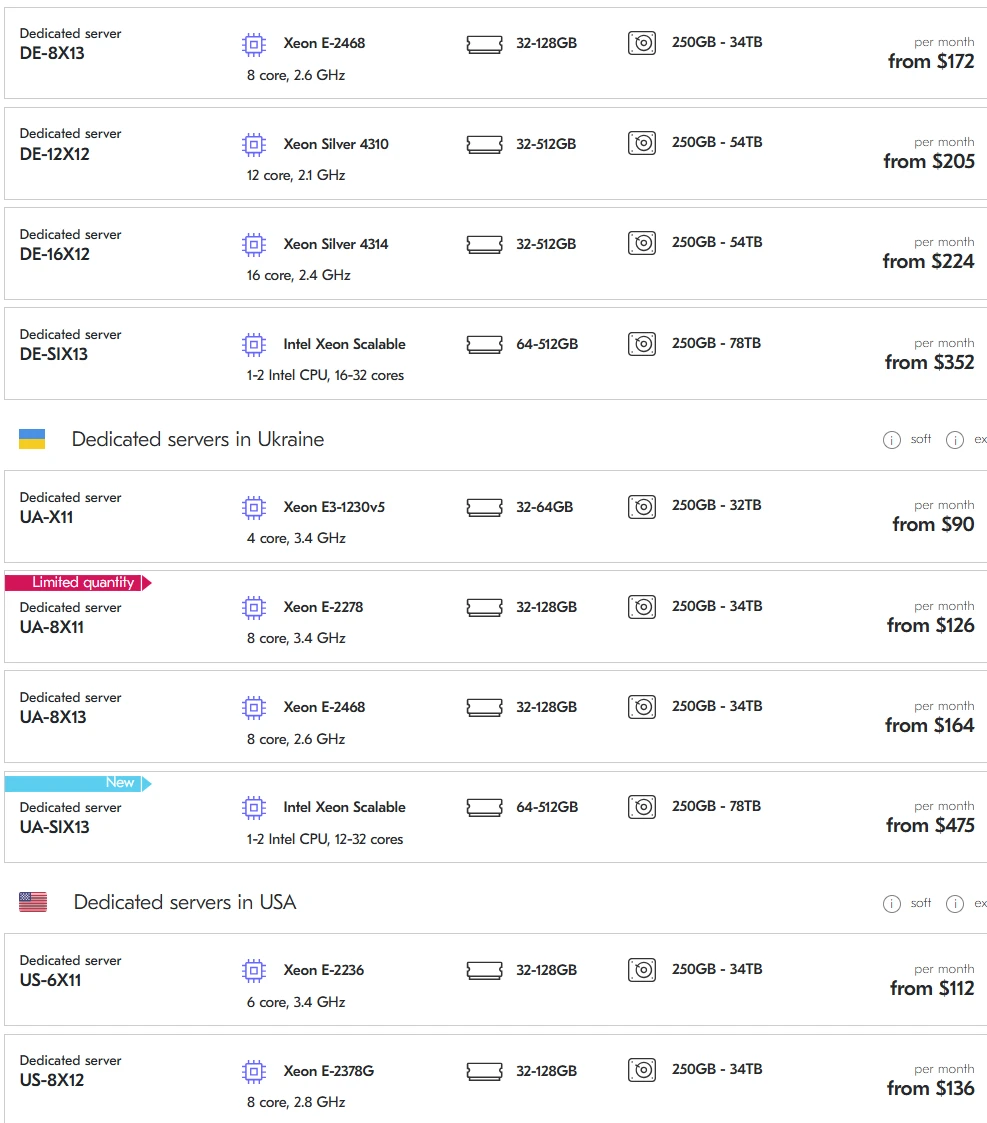
When looking at dedicated servers, the first thing to notice is the CPU. The screenshot shows several intriguing options: the UA-X11 with a Xeon E3-1230v5 at 4 cores and 3.4 GHz, the UA-8X11 and UA-8X13 featuring Xeon E-2278 and E-2468 at 8 cores, and the heavyweight UA-SIX13 with Intel Xeon Scalable CPUs offering 12 to 32 cores. Across the ocean, in the USA, the US-6X11 and US-8X12 feature Xeon E-2236 and E-2378G processors. Each choice comes with different RAM and storage capacities, ranging from 32GB to a jaw-dropping 512GB RAM and 250GB–78TB of storage.
Let’s break down how these specs matter. CPU cores dictate how many simultaneous processes a server can handle. More cores mean your server can juggle more tasks at once—think of it like hiring extra chefs in a busy restaurant. RAM influences how much “working memory” your server has, and storage determines how many ingredients—files, databases, applications—you can store. But here’s a kicker: price per month grows with memory and storage. Sometimes, you might be shocked to see that doubling the RAM can nearly double the price, which is worth considering if your workload is moderate.
CPU Choices and Use Cases
UA-X11 (4 cores, 3.4 GHz): Ideal for small projects. Think personal blogs, light web apps, or prototype testing. The single CPU may feel cozy, but it’s efficient and won’t drain your budget—starting at $90 per month, it’s practically a steal for entry-level projects. Imagine running a small café: you don’t need ten chefs if you only serve sandwiches.
UA-8X11 & UA-8X13 (8 cores): These servers are more robust, handling medium-scale applications such as e-commerce stores, multi-user content platforms, or analytic dashboards. UA-8X11’s higher 3.4 GHz clock makes it slightly snappier than UA-8X13’s 2.6 GHz, but the latter can be better for tasks optimized for multi-core workloads rather than sheer speed per core. Price-wise, UA-8X11 starts at $126, while UA-8X13 is $164—a reasonable step up if you need more computational muscle.
UA-SIX13 (12–32 cores): This is a powerhouse. It’s like moving from a small café to a full-scale banquet hall. Perfect for data-intensive applications, machine learning, virtualized environments, or large SaaS platforms. With 64–512GB RAM and 250GB–78TB storage, it’s ready to handle massive workloads. The price starting at $475 reflects the high-end capabilities, but if your application demands serious resources, this is your server.
Across the USA, US-6X11 (6 cores, 3.4 GHz, $112/month) and US-8X12 (8 cores, 2.8 GHz, $136/month) offer similar performance for local projects, ideal for businesses focusing on US-based users. Latency drops, and faster connectivity improves user experience for geographically targeted traffic.
RAM and Storage: The Silent Heroes
RAM is a silent hero. For instance, all UA servers start at 32GB, but the top-tier UA-SIX13 goes all the way to 512GB. That’s like having an enormous pantry versus a tiny cupboard—you can cook bigger, more complex meals without running out of space. Storage is equally important. All servers start at 250GB, but high-end plans scale up to 78TB. If you’re dealing with large databases, media files, or backup-heavy operations, more storage is a must. However, cost escalates with both RAM and storage. Sometimes, spending $50 extra per month for an additional 64GB RAM can prevent performance bottlenecks—a worthy investment if downtime or slow response could cost your business.
Geographical Considerations: Ukraine vs. USA
Many businesses underestimate the impact of server location. Ukrainian servers (UA-X11, UA-8X11, UA-8X13, UA-SIX13) are cost-effective and great for projects targeting European audiences or local traffic. But for a US audience, the US-6X11 or US-8X12 servers can significantly reduce latency, offering smoother user experiences. Consider a scenario: you’re running an online store in New York. Hosting on a Ukrainian server might work, but page load times could be slower, frustrating users. Hosting in the US keeps your site snappy, which directly translates to higher conversions and happier clients.
Pricing Nuances: Memory, Cores, and Your Budget
Server pricing isn’t linear. Doubling RAM or cores doesn’t just double performance—it can also double or triple your monthly expense. For example, upgrading from UA-8X11 ($126) to UA-8X13 ($164) gives you slightly slower CPU per core but more efficient multi-core processing and more RAM capacity. Sometimes, less clock speed is more if your application is highly parallel. Always consider what your workload truly demands: a few fast cores or many cores handling simultaneous processes.
Storage prices are similarly tricky. High storage capacity in UA-SIX13 (up to 78TB) is enticing, but do you really need all that space? It’s like renting a huge storage unit: convenient, but costly if half of it sits empty. Strategically calculating required storage and memory ensures you don’t overspend.
Practical Analogies: Choosing a Server Like Choosing a Vehicle
Think of servers as vehicles. UA-X11 is a compact car: economical, easy to maneuver, perfect for city driving. UA-8X11 and UA-8X13 are sedans and SUVs: comfortable, flexible, suitable for medium-sized families (projects) with heavier cargo. UA-SIX13? That’s a truck or limousine: powerful, capable of transporting tons of data, but with a higher fuel (cost) requirement. US-based servers are like local dealerships: they reduce delivery times (latency) and ensure maintenance is nearby. The analogy is simple but effective: choose your server like you choose transportation—based on your destination, load, and speed requirements.
Emotional Take: The Surprise of Server Costs
It’s always a bit shocking the first time you see the price jump between server tiers. You think, “$475 per month for a server?” And yet, when you calculate the value—hundreds of users, massive databases, zero downtime—it suddenly seems reasonable. It’s like discovering a luxury coffee machine costs more than a kettle, but it makes a perfect espresso every time. Investing in the right server isn’t splurging; it’s enabling your project to breathe, scale, and thrive.
Conclusion: Making the Smart Choice
In the end, choosing a dedicated server boils down to three key factors: CPU performance, RAM/storage needs, and geographic placement. Small projects or experimental apps thrive on UA-X11. Medium-scale platforms benefit from UA-8X11 or UA-8X13, while massive, data-heavy environments demand UA-SIX13. For US-targeted audiences, US-6X11 and US-8X12 offer lower latency and localized support. Consider your workload, budget, and growth potential. Don’t overspend on unused resources, but also don’t under-provision—a slow server frustrates users faster than a rainy Monday morning.
Take a moment to envision your project’s future. Do you want speed, reliability, and room to grow? Then it’s time to act. Choose wisely, invest smartly, and watch your digital project flourish like a well-tended garden. Your users will thank you, your business will thank you, and honestly, you’ll thank yourself for making a decision that’s both practical and ambitious. Don’t just rent a server—unlock potential.