




Advertisement
Overview
IINA was first released in January 2017 by developer Collider Li (lhc70000) as a from-scratch attempt to bring a genuinely native, modern interface to Mac video playback, at a time when most capable open source players on macOS were ports of Windows or Linux tools with non-native UI toolkits. Rather than writing its own decoding and rendering engine, IINA is built on top of libmpv, the library form of the mpv media player, giving it mpv’s broad codec and container support (including formats like MKV, FLAC, and HDR video) while wrapping it in a Swift and native Cocoa/AppKit interface designed specifically to match macOS conventions — Touch Bar support, Force Touch, Picture-in-Picture, and full support for Apple silicon alongside Intel Macs. The project is released under the GPL-3.0-or-later license, with source and issue tracking hosted on GitHub under the iina organization.
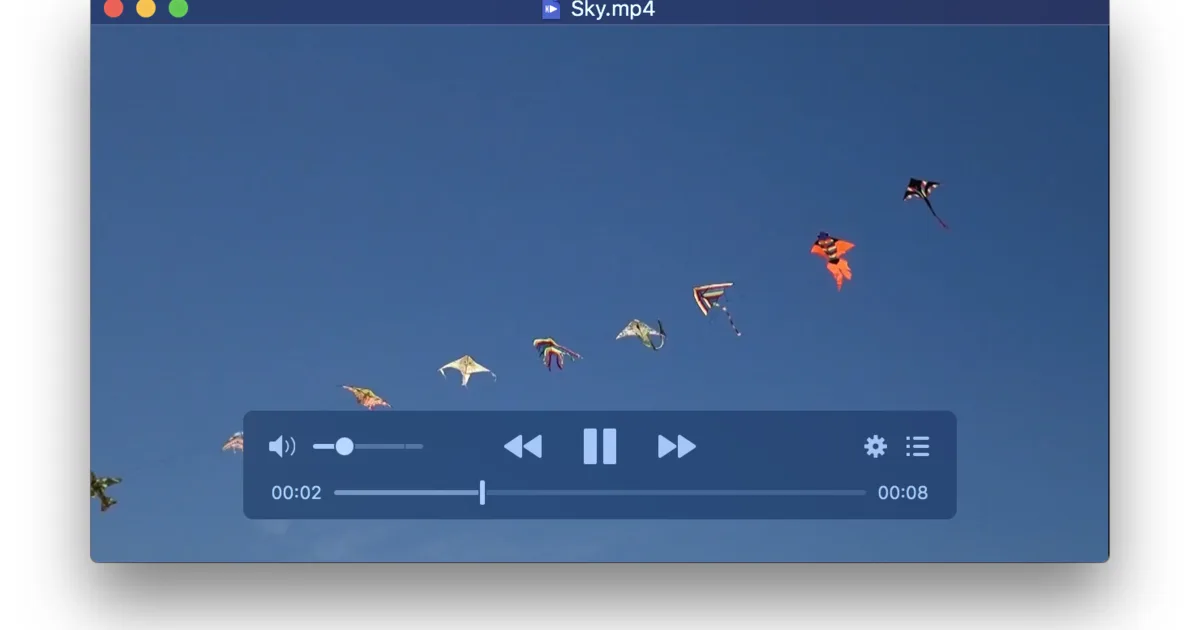
Where mpv is deliberately minimal and configuration-file-driven, aimed at users comfortable editing text config and Lua scripts to shape the player’s behavior, IINA inverts that approach: it exposes mpv’s underlying power through graphical preference panes, an on-screen control bar styled like a native macOS app, drag-and-drop subtitle and file handling, and a plugin system written in JavaScript rather than mpv’s Lua scripting. Development has continued steadily through 2026, with releases (most recently 1.4.x) shipping regular bug fixes and macOS compatibility updates. It remains a community-maintained project rather than a commercial product, without corporate backing.
Key Features
- Native macOS interface — Built with Swift and AppKit for a UI that matches macOS design conventions, rather than a cross-platform toolkit port
- Built on libmpv — Inherits mpv’s decoding engine and format support, including MKV, FLAC, and HDR playback, without mpv’s config-file-first workflow
- Picture-in-Picture — Native macOS PiP support for keeping a video floating over other windows
- Touch Bar and gesture support — Force Touch scrubbing, Touch Bar controls, and trackpad gestures on supported Macs
- Music mode — A compact mini-player layout for playing audio-only files or hiding the video track
- JavaScript plugin system — Extend playback behavior and UI without touching mpv’s Lua scripting layer
- Apple silicon native — Universal binary support for both Intel and Apple silicon Macs
- Online subtitle search — Built-in subtitle downloading integrated directly into the interface
Use Cases
- Everyday macOS video playback — A drop-in QuickTime replacement that plays far more formats without installing codec packs
- Music and audio files — Music mode strips away the video UI for a lightweight audio player
- Mac users who want mpv’s engine without its interface — Getting libmpv’s format support and performance through a graphical, native app instead of config files
- Multi-monitor and PiP workflows — Watching video in a floating window while working in other apps
Who It’s For
IINA is the natural pick for macOS users who want a free, modern, genuinely native video player rather than a ported interface — it looks and behaves like a Mac app because it is one, while still inheriting mpv’s format and codec strength underneath. It’s a better fit than mpv itself for anyone who wants a graphical, discoverable interface instead of editing config files and Lua scripts, though that same design means it’s macOS-only and won’t help Windows or Linux users the way mpv or VLC would.
Advertisement