Practical AI image generation workflows for teams
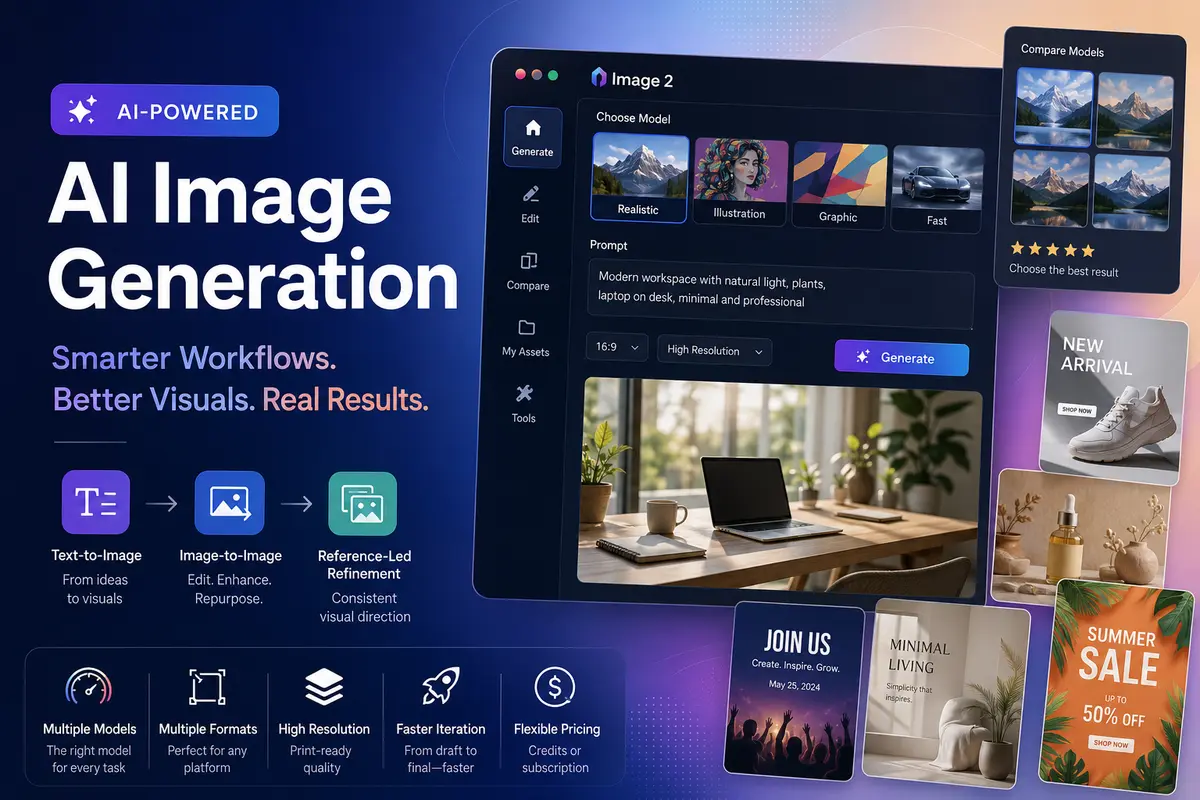
Visual content has become an essential part of modern communication. Businesses, creators, marketers, ecommerce brands, and design teams all rely on images to engage audiences, explain ideas, promote products, and strengthen brand identity. As the demand for visual content grows, teams are looking for ways to produce high-quality assets efficiently without sacrificing creative control.
AI image generation has matured considerably over the past few years. Tools built on models like Stable Diffusion, DALL-E, and Midjourney have demonstrated that text-to-image workflows can support real production needs — not just experimentation. The practical question for most teams is no longer whether AI image tools are viable, but how to build workflows around them that fit their specific goals.
Text-to-image generation
Text-to-image generation is one of the most widely used AI-powered creative workflows. By transforming written prompts into visual outputs, creators can quickly explore concepts for marketing campaigns, blog illustrations, advertising materials, presentations, and digital content. This process can reduce the time required to move from an initial idea to a visual draft while still allowing room for creative experimentation.
Getting good results from text-to-image tools generally requires some prompt discipline. Specificity matters — describing lighting, composition, style, and subject together tends to produce more usable outputs than vague descriptions. Teams that invest time in building a shared prompt library often find their output quality improves significantly over time.
Image-to-image editing
Image-to-image editing is equally valuable in practical production environments. Many teams already have existing visuals that need adjustments rather than complete replacement. AI-assisted editing can help modify backgrounds, update styles, enhance compositions, or adapt graphics for different formats and channels. This flexibility makes it easier to repurpose content while maintaining visual consistency.
This workflow is particularly useful for brand teams managing large asset libraries. Rather than commissioning new imagery for every campaign variation, existing photos or graphics can be adapted through AI editing — changing backgrounds, adjusting colour grading, or restyling elements to match a seasonal theme.
Reference-led visual refinement
Another growing use case involves reference-led visual refinement. Instead of relying entirely on text prompts, users can guide the creative process with reference images. This workflow is particularly useful for maintaining a consistent visual direction across campaigns, product collections, or branded content. Designers and marketing teams benefit from having more control over how generated visuals evolve throughout the creative process.
Use cases by team type
Marketing teams
Marketing professionals frequently need a wide range of assets — social media graphics, advertising concepts, promotional banners, posters, event materials, and campaign visuals. AI image workflows can support these requirements by helping teams rapidly generate concepts and refine selected designs. Rather than replacing creative decision-making, these tools assist with ideation and production, enabling teams to focus on strategy and messaging.
Ecommerce businesses
Ecommerce businesses face constant demand for product-focused imagery. Product pages, advertisements, seasonal campaigns, and marketplace listings often require multiple visual variations. AI-assisted workflows can help generate lifestyle scenes, promotional graphics, alternative backgrounds, and marketing visuals that support different business objectives — especially useful when testing new creative directions or producing content for multiple channels.
Choosing between multiple models
One practical challenge is that no single AI image model excels at every task. Some models handle photorealistic output well; others are stronger for illustration, graphic design, or stylised art. Teams that lock into a single model often find gaps when project requirements shift.
Multi-model platforms address this directly. Tools such as Image 2 bring several image generation workflows into a single environment, allowing users to select the model that fits the task rather than adapting every task to one model. Supported workflows may include options suited to photorealistic output, illustrative styles, and lightweight generation for faster iteration. For teams running regular content production, this kind of flexibility reduces friction when requirements change.
Model comparison features can further simplify evaluation. Designers and content teams may compare image quality, artistic style, detail levels, or composition results before committing to a final direction. This is more efficient than maintaining separate accounts across multiple tools.
Production and workflow considerations
A few practical factors are worth considering when building any AI image workflow:
- Aspect ratio and format controls — platforms that handle resizing and cropping natively save time when producing assets for multiple channels (social, web, print).
- Resolution output — for professional or print use, check whether the selected model supports high-resolution export before building a workflow around it.
- Iteration speed — some models prioritise quality over speed; others are optimised for rapid drafting. Knowing which you need at each stage of production matters.
- Access and cost model — credit-based and subscription models suit different usage patterns. Teams with predictable high volume often do better on subscriptions; occasional users may prefer pay-as-you-go credits.
- Centralising tools — switching between multiple platforms for generation, editing, and comparison adds overhead. Where possible, consolidating into fewer tools improves the end-to-end workflow.
Closing thoughts
As AI-powered visual creation continues to evolve, practical workflows are becoming increasingly important for teams of all sizes. Whether the goal is creating marketing creatives, refining product imagery, producing social media content, or supporting broader design workflows, the teams seeing the best results tend to be those that treat AI image tools as a structured part of their production process — not a one-off shortcut.
Evaluating tools against real project requirements, building internal prompt standards, and choosing platforms that support flexibility across models are all steps worth taking before committing to any particular workflow.
Comments
Comments are loaded when you choose to open them, which keeps the page faster and lighter.