



Advertisement
Overview
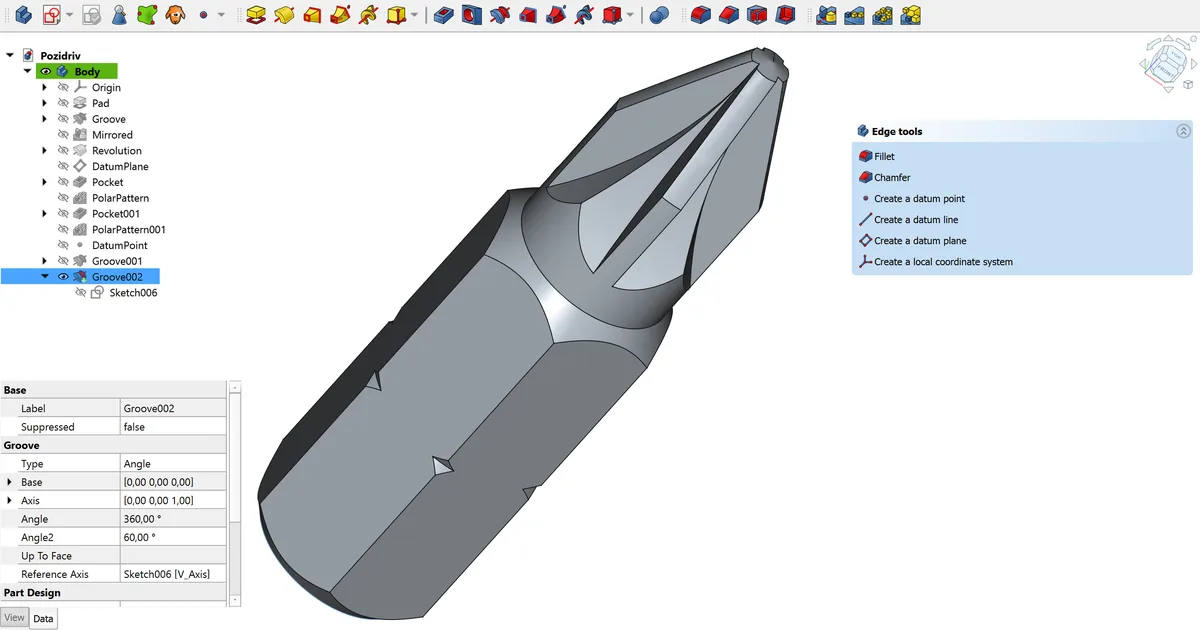
FreeCAD development began in 2001 as an internal project by Jürgen Riegel at an industrial automation company, and it was released publicly in 2002 after being shared on SourceForge. It was designed from the outset around a parametric, feature-based modeling approach similar to commercial CAD systems like SolidWorks and Autodesk Inventor, where a model is built as a history of parametric operations rather than raw static geometry.
The project’s architecture is built around a plugin-based “workbench” system, letting the core application be extended with specialized toolsets for different engineering disciplines. Version 1.0, released in late 2024, marked a major milestone after more than two decades of development, bringing a significantly overhauled user interface, an improved assembly workbench, and better real-time rendering.
Key Features
- Parametric modeling — Feature-based history tree that lets earlier steps in a model be edited and propagated forward
- Workbench system — Modular toolsets (Part Design, Sketcher, Draft, Arch, FEM, and more) that can be swapped based on the task
- Assembly workbench — Constraint-based assembly modeling for multi-part designs
- FEM workbench — Finite element analysis integration for structural simulation
- Python scripting — Full Python API for automation, custom workbenches, and macro recording
- DWG/DXF and STEP support — Import/export for common CAD interchange formats, including DWG via plugins
Use Cases
- Mechanical part design — Parametric modeling of individual components and assemblies
- Product design — Iterative design work where dimensions and features need to remain editable
- Architecture (via Arch workbench) — Basic building information modeling workflows
- Education and hobbyist engineering — 3D printing design and maker-community projects
Who It’s For
FreeCAD is suited to mechanical engineers, product designers, and hobbyists who want parametric CAD capability without commercial licensing costs. Its plugin-based workbench system also appeals to users who need to extend the application with custom, discipline-specific tools, though DWG interoperability with AutoCAD workflows may require additional plugins or format conversion.
Advertisement