Manjaro 26.1 'Bian-May' Released with GNOME 50, Plasma 6.7, and Kernel 7.1
The Manjaro team has released Manjaro 26.1, codenamed “Bian-May”. This update follows Manjaro 26.0 Anh-Linh from January 2026 and brings fresh desktop environments, kernel updates, and display improvements across all three official editions.
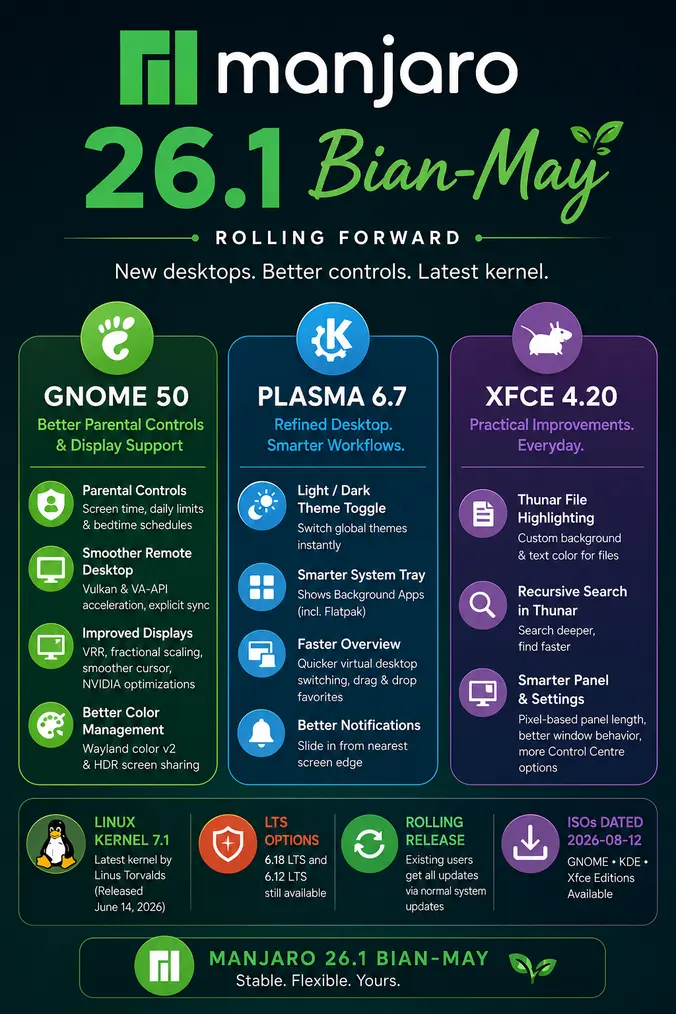
GNOME Edition: GNOME 50 with Better Parental Controls and Display Support
The GNOME edition ships with the GNOME 50 “Tokyo” series, first released in March 2026. This is a significant upgrade from the GNOME 49 series included in Anh-Linh.
Parental controls see a major improvement in GNOME 50. For the first time, parents and guardians can monitor screen time and set daily limits and bedtime schedules for child accounts directly from Settings. The screen locks automatically when a limit or bedtime is reached, and guardians can extend time on the fly when needed. Manjaro also bundles Big Parental Controls 1.0 from its sister project Big Linux, to meet recent legal requirements in Brazil.
Remote desktop performance has improved with new hardware acceleration support using Vulkan and VA-API. This makes remote sessions noticeably smoother with less lag and lower power draw. Compatibility is also wider thanks to explicit sync support, which helps users running NVIDIA drivers.
Display handling receives several updates. Variable Refresh Rate (VRR) and fractional scaling are more stable, with better bug fixes and user experience improvements. The mouse cursor now moves independently of the application frame rate while VRR is active, keeping it fluid at the monitor’s native refresh rate even when a game runs at a lower rate. NVIDIA users also get targeted fixes for stuttering and frame-timing issues.
Color management moves forward with support for version 2 of the Wayland color management protocol. HDR screen sharing is also available, allowing screen recording tools to capture HDR content with accurate colors.
KDE Plasma Edition: Plasma 6.7 with New Controls and Refined Desktop
The Plasma edition ships with Plasma 6.7, KDE Frameworks 6.28, and KDE Gear 26.04. This release focuses on refining common workflows and adding features that users have requested for some time.
A new quick toggle lets users switch between light and dark Global Themes instantly, building on the day-night cycle theming introduced in Plasma 6.6. The System Tray now also surfaces apps using the newer Background Apps system, which is more common for Flatpak applications.
Virtual desktop switching in the Overview is faster. Users can drag and drop favorites, and software management is more straightforward. Time zone comparison is easier, and type-ahead works on the desktop. Notifications now slide in from the nearest screen edge, making them more visible without being disruptive.
Xfce Edition: Xfce 4.20 Refinements
The Xfce edition continues with Xfce 4.20, which brings a useful set of practical improvements.
Thunar, the file manager, gains a file highlighting feature. Users can set a custom background colour and foreground text colour on individual files through the file properties dialog, making it easier to pick out specific files in a busy directory. Thunar also gains recursive search.
Panel configuration adds two new options: panel length is now set in pixels rather than percentages, and a new option lets maximised windows fill the space behind the panel rather than stopping at its edge. Control Centre gets new options across several modules, including the ability to disable header bars in dialogs, show or hide a delete option in file context menus, and set a default multi-monitor behaviour before attaching a second screen.
Kernel 7.1 and LTS Options
Manjaro 26.1 uses Linux kernel 7.1 as the default, released by Linus Torvalds on June 14, 2026. For users who need longer-term stability, the 6.18 LTS and 6.12 LTS kernels remain available.
Download
The ISOs are dated 2026-08-12. You can download Manjaro 26.1 Bian-May from the official Manjaro release announcement. GNOME, KDE, and Xfce editions are all available.
As a rolling release, existing Manjaro users can get all these updates through normal system updates without a fresh install. For a look at what came before, see the Manjaro 24.2 Yonada release coverage for context on how the project has progressed.