Haiku

Haiku at a glance
- Status
- Active
- Type
- Other
- Popularity
- Not ranked
- Based on
-
- Independent
Haiku is a free and open source operating system for personal computers, inspired by BeOS. It is not a Linux distribution: the kernel, system servers, application programming interface and desktop are all developed together by one project, which gives Haiku a consistent design from the boot loader to the applications. Most of its code is released under the MIT license.
The project started in August 2001 as OpenBeOS, shortly after Be Inc. stopped developing BeOS, with the goal of recreating that system as open source software. It celebrated its 25th anniversary in August 2026, a week before releasing R1/beta6. Haiku is developed by a volunteer community and supported by Haiku, Inc., a US-based 501(c)(3) non-profit that funds development through donations.
Haiku is aimed at users who want a fast, responsive and coherent desktop that is simple to learn, and at developers interested in operating system design outside the Unix-like mainstream. Like ReactOS and Redox OS, it is one of the few independent desktop operating systems still in active development.
Key features of Haiku
- Custom kernel built for responsiveness: Haiku’s kernel is derived from NewOS and designed with desktop responsiveness as a priority.
- Pervasive multithreading: every window in a Haiku application runs in its own thread, which keeps the interface responsive even when an application is busy.
- BFS file system: the Be File System stores extended attributes on files and indexes them, so the file system can be searched like a database.
- Object-oriented C++ API: a single, well-documented API, largely compatible with the BeOS API, covers windows, media, networking and storage.
- Integrated desktop: the Tracker file manager and the Deskbar taskbar are part of the system rather than a separate desktop environment.
- Vector icons: system icons are vector graphics, edited with the built-in Icon-O-Matic tool, and scale cleanly on high-resolution displays.
- Localization: the interface is translated into more than 25 languages.
The Haiku desktop: Tracker and Deskbar
Haiku does not offer a choice of desktop environments as Linux distributions do. Its desktop is made of two system components that Be Inc. released as open source in 2001 and which Haiku has developed further:
- Tracker is the file manager and desktop. It shows files, folders and mounted volumes, and its Find window runs file system queries.
- Deskbar combines the application menu, the list of running applications and the system tray. By default it sits in the top-right corner of the screen and can be moved to any edge.
Windows use Haiku’s distinctive yellow tabs, which can be stacked together and tiled, so several windows can be grouped and moved as one. The appearance follows a single system-wide look, with dark mode and high-DPI scaling options in the Appearance preferences.
BFS, attributes and queries
The Be File System (BFS) is one of Haiku’s defining features. Every file can carry extended attributes, such as the sender of an e-mail, the artist of a song or a person’s phone number. When an attribute is indexed, BFS can find every file that matches it almost instantly, without a separate search database.
Haiku builds whole applications on this capability. E-mails are stored as individual files with attributes, and the People application stores contacts the same way, so Tracker can display and sort them like a mail client or address book. Saved queries behave like live folders that update as files change. In R1/beta6, queries can also be limited to a specific folder, both in Tracker’s Find window and with the query command-line tool.
Installing software on Haiku
Haiku uses its own package management system. Packages are compressed file system images that are mounted at boot rather than unpacked onto the disk, so installing or removing a package cannot leave stray files behind. The system keeps previous package states, which makes it possible to boot an earlier state after a bad update.
- HaikuDepot is the graphical application for browsing, installing and rating software.
- pkgman is the command-line package manager.
- SoftwareUpdater installs updates for the system and installed packages.
Most third-party software is packaged by HaikuPorts, which provides ports of open source programs, including many Qt-based KDE applications and GTK applications. Haiku ships with WebPositive, a WebKit-based web browser, and R1/beta6 added official support for browsers based on Mozilla Firefox on 64-bit systems.
What’s new in Haiku R1/beta6
Haiku R1/beta6 was released on August 26, 2026, about two years after R1/beta5, and resolves more than 530 bugs and enhancement tickets. Highlights include:
- Firefox-based browsers: Firefox, LibreWolf, Waterfox, Floorp and the Icedove mail client are available on x86_64.
- Hardware virtualization for QEMU: an experimental port of NVMM, the NetBSD Virtual Machine Monitor, lets QEMU run virtual machines with acceleration by passing
-accel nvmm. - Go programming language: a port of Go is now available in the package repositories.
- Tracker improvements: menus update live when Shift is pressed, and queries can be restricted to a folder.
- Disk cleanup: SoftwareUpdater and the new
pkgman cleanupcommand remove old package states. - Screenshot area selection: the PrintScreen tool can capture a selected region.
- Team monitor grouping: the Ctrl+Alt+Del team monitor groups background subprocesses with their parent application.
- DriveSetup disk images: a new menu for working with disk image files.
- app_server restarts: running applications reconnect after the display server restarts.
- System and hardware work: a new userland memory allocator based on OpenBSD’s, more USB Ethernet and Wi-Fi devices through the FreeBSD and OpenBSD driver compatibility layers, FAT support for volumes over 2 TB, many dark mode and HiDPI fixes, and the ability to boot 32-bit systems with about 128 MB of RAM again.
The full list is in the official R1/beta6 release notes.
Installing Haiku
Haiku is distributed as an anyboot image for 32-bit x86 and 64-bit x86 (x86_64). The same image can be written to a USB drive or burned to a DVD, and it boots on both BIOS and UEFI systems. At the boot menu, you choose a language and keymap, then pick Try Haiku to run a live session or Install Haiku to start the Installer.
A few points to plan for before installing:
- Prepare a partition in advance: Haiku cannot resize existing partitions. Create free space with a tool such as GParted first. The project recommends a partition of at least 3 GB, while the R1/beta6 recommended configuration lists 16 GB of storage.
- Format the partition as BFS: inside the Installer, use DriveSetup to create a partition of type “Be File System” and format it, keeping query support enabled.
- Set up booting: the Installer does not change an existing boot manager. You can install Haiku’s own BootManager from the Installer’s Tools menu, or add Haiku to GRUB with a chain-loading entry.
- Try it in a virtual machine first: QEMU, VirtualBox and similar tools are an easy way to test Haiku before installing it on hardware.
Upgrading from R1/beta5
Only upgrades from R1/beta5 are supported. Open a Terminal and run:
pkgman add-repo https://eu.hpkg.haiku-os.org/haiku/r1beta6/$(getarch)/current
pkgman add-repo https://eu.hpkg.haiku-os.org/haikuports/r1beta6/$(getarch)/current
pkgman full-sync
Then reboot the system.
Hardware support and architectures
Haiku officially supports 32-bit x86 and x86_64. Ports to ARM64, RISC-V and other architectures are in progress; the ARM64 port boots to the desktop under virtualization but is not part of the release. Firefox-based browsers are only available on x86_64.
Hardware support is narrower than on Linux. Network drivers are largely shared with FreeBSD and OpenBSD through a compatibility layer, and graphics drivers handle display output and mode setting but do not provide 3D hardware acceleration, so 3D graphics are rendered in software. Testing the live image on your machine before installing is the best way to check Wi-Fi, audio and display support.
BeOS compatibility
Haiku was created as the spiritual successor of BeOS, and compatibility shapes its design:
- The 32-bit x86 build runs BeOS R5 applications without recompiling.
- The 64-bit build drops binary compatibility with BeOS but keeps the BeOS API, so source code can be ported with little effort.
Haiku has since moved well beyond BeOS, with modern hardware drivers, package management, localization, a WebKit browser and ports of current open source software.
Who should use Haiku?
- Enthusiasts of alternative operating systems who want to try a complete desktop system that is not based on Unix-like Linux or BSD conventions.
- Former BeOS users looking for its modern successor.
- Developers interested in operating system internals, C++ desktop APIs or porting software; the codebase is large but consistent.
- Owners of older PCs, since the 32-bit build runs on modest hardware.
Haiku is less suited as a primary system if you depend on proprietary software, need 3D acceleration or gaming, or use hardware without supported drivers. For a mature open source desktop, consider a Linux distribution such as Linux Mint or Fedora, or a BSD system such as FreeBSD.
History of Haiku
- August 18, 2001: the project is announced as OpenBeOS after Be Inc. stops developing BeOS.
- June 2004: the new name Haiku and its logo are announced at the first WalterCon conference.
- September 14, 2009: Haiku R1/alpha1, the first official release, is published.
- October 2013: the package management system is merged into Haiku.
- September 2018: R1/beta1 is released, the first release to ship package management, HaikuDepot and pkgman.
- June 2020 and July 2021: R1/beta2 and R1/beta3 follow.
- September 13, 2024: R1/beta5 is released.
- August 26, 2026: R1/beta6 is released, a week after the project’s 25th anniversary.
Haiku community and support
- Official website and downloads
- Haiku User Guide
- Haiku forum
- HaikuPorts on GitHub
- Source code (mirror of the project’s Git repository)
- IRC:
#haikuon OFTC
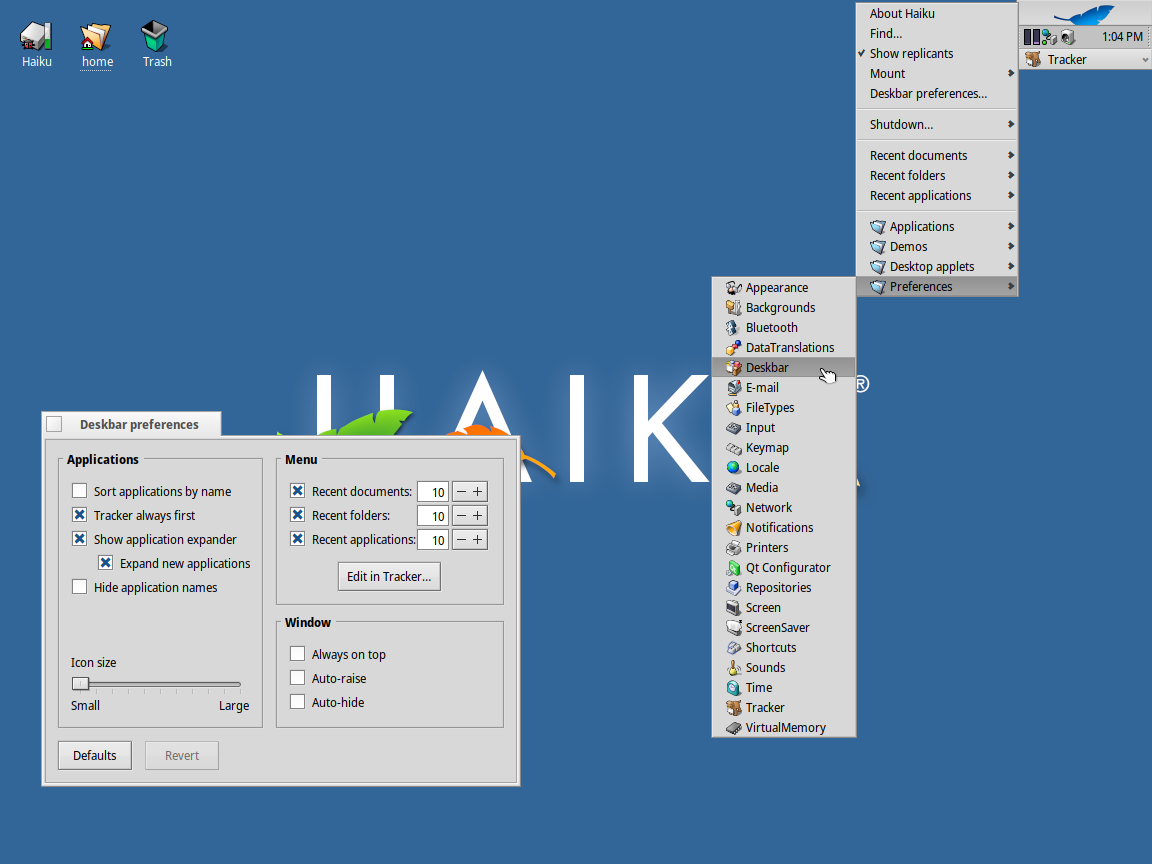 The Haiku desktop with the Deskbar menu and Deskbar preferences open (official Haiku slideshow screenshot)
| Releases |
Frequently asked questions on Haiku
-
Is Haiku a Linux distribution?
No. Haiku has its own kernel, derived from the NewOS kernel, and its own system libraries, servers and desktop. It is a complete, independent operating system rather than a Linux or BSD derivative, although it reuses some FreeBSD and OpenBSD network drivers through a compatibility layer.
-
Can Haiku run BeOS applications?
The 32-bit x86 build of Haiku keeps binary compatibility with BeOS R5 applications. The 64-bit build does not run old BeOS binaries, but it keeps source compatibility with the BeOS API, so applications can be recompiled.
-
Is Haiku stable enough for daily use?
The project still labels its releases as beta-quality software. Many people use Haiku as a secondary system for browsing, writing, programming and media, but it is not yet a full replacement for mainstream desktop systems, and hardware support, especially for Wi-Fi and modern GPUs, is narrower.
-
What web browsers are available on Haiku?
Haiku ships with WebPositive, a WebKit-based browser. Since R1/beta6, browsers based on Mozilla Firefox, including Firefox itself, LibreWolf, Waterfox and Floorp, are available from the package repositories on 64-bit x86 systems.
-
How do I install software on Haiku?
Use HaikuDepot, the graphical package manager, or the pkgman command in the Terminal. SoftwareUpdater installs system and package updates. Packages come from the Haiku and HaikuPorts repositories.
-
What are the hardware requirements for Haiku?
According to the R1/beta6 release notes, the minimum for the 32-bit build is an Intel Pentium II or AMD Athlon, 256 MB of RAM, an 800x600 display and 2 GB of storage. The recommended setup for the 64-bit build is an Intel Core i3 or AMD Phenom II, 2 GB of RAM, a 1366x768 display and 16 GB of storage.
Last updated: November 27, 2026
What do you think about Haiku?