GNOME Shell Design Plans: Search Overlay, Tiling, and More
The GNOME Shell design team has published a detailed look at the features it wants to bring to the desktop in the coming cycles. These are not shipping today — some are near-complete, others are early concepts — but they give a clear picture of where the team wants to take GNOME Shell.
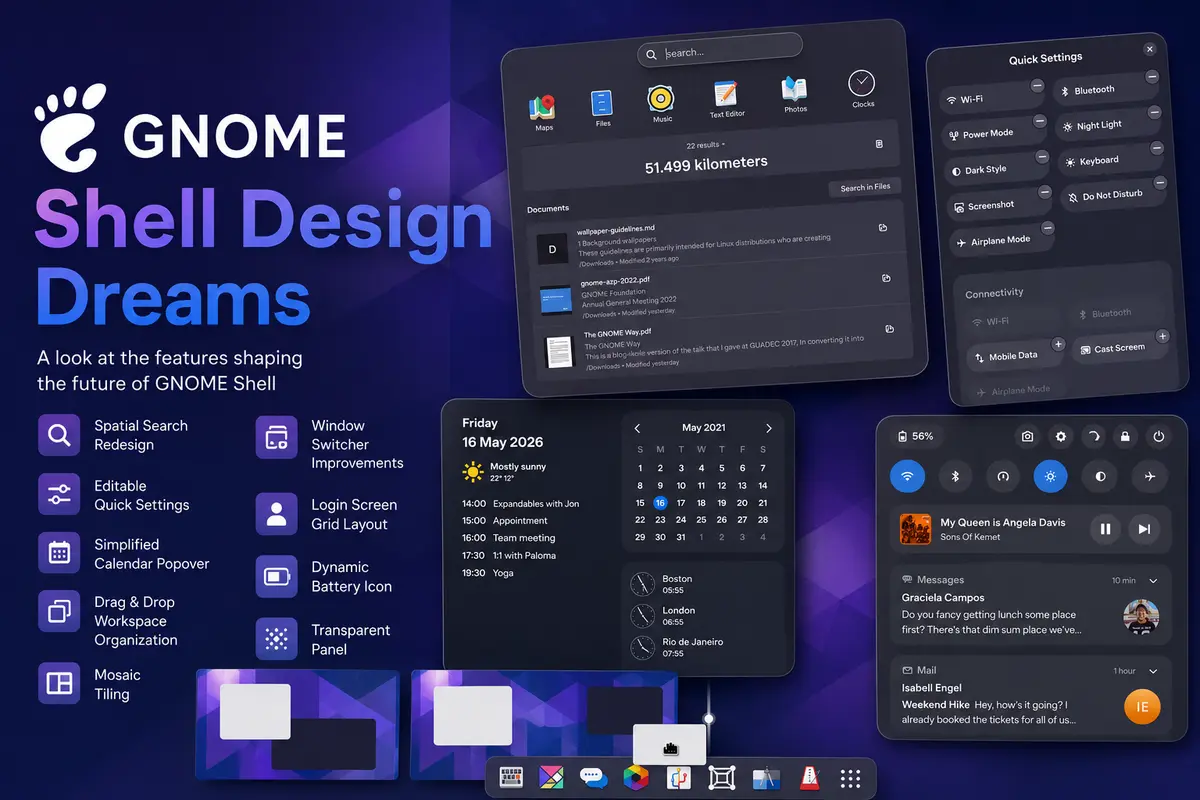
The post, written by GNOME designer Tobias Bernard on the GNOME Shell & Mutter development blog, covers nine areas the team has explored. Each comes with design mockups and, in some cases, prototype extensions or in-progress merge requests.
Search Gets a Spatial Redesign
GNOME 40 introduced a coherent spatial navigation model, but search was always left out. Today, typing in the overview replaces everything with results — no animation, no spatial logic. The team wants to fix this with a search overlay that slides out from the search entry above the rest of the overview. A merge request is already open and the team expects this to land in GNOME 51 this autumn. Richer result types — file previews, multiple actions per result, and filters — are also on the roadmap.
Editable Quick Settings
The Quick Settings menu has grown over the years as dark style, night light, power modes, and keyboard backlight controls were added. The team now wants users to be able to customize which toggles appear, similar to how Android and iOS handle their status panels. The proposal is an inline editor built into the menu itself, letting users add or remove niche toggles without visiting Settings.
Simplified Calendar Popover
The clock popover in the top bar currently mixes notifications, calendar events, world clocks, and weather in one panel. The team wants to move notifications into the Quick Settings panel — grouping the two most-accessed status areas — and leave only calendar, events, clocks, and weather in the clock popover. This mirrors what Android and Chrome OS already do.
Drag and Drop Window Organization
During the prototyping phase leading up to GNOME 40, the team experimented with drag-and-drop workspace management. The idea: when you drag a window in the overview, the real workspaces scale down to become larger drop targets, removing the need to aim at the small workspace thumbnails at the top. Developer Cleo Menezes Jr. has built a spatial-overview extension to test this, and the design team wants to iterate on it.
Mosaic Tiling
The Mosaic concept — which auto-resizes windows to fit new ones by negotiating space based on each window’s optimal size — has been in design for years. The technical blocker is compositor-level support, which extensions cannot provide cleanly. The MosaicWM extension by Cleo Menezes Jr. implements most of the concept and is actively maintained. The design team is collaborating with them, and the project also needs groundwork in Mutter such as better tiling APIs and richer min/max size metadata.
Window Switcher Improvements
The Super+Tab / Alt+Tab switcher groups windows by app, which keeps the list short but makes it harder to jump to an arbitrary recent window quickly. The team’s hypothesis is that there are two distinct use cases: switching to one of the last few windows, and finding any window by keyboard. A redesigned switcher might show individual windows for recent entries and grouped entries for older ones. The team says this is a good candidate for extension prototyping if anyone wants to help.
Login Screen Grid
The current login screen is a simple list. The team wants a visual grid layout — with user avatars — to make the first thing users see after booting feel more welcoming. This one has reportedly come close to happening several times but never shipped.
Dynamic Battery Icon
Both Android and iOS moved to a wider, more expressive battery indicator. The GNOME team wants the same: a dynamic icon that better conveys charge level and can integrate the percentage more cleanly. This is especially useful on GNOME Shell Mobile, where panel space and battery information are more critical.
Transparent Panel
When a wallpaper is low-contrast and uniform in color, there is no visual reason to show the panel background. The team wants the panel to become transparent in this case, letting the wallpaper show through. A near-complete implementation from Jonas Dreßler exists, but needs testing, polish, and review.
How to Help
None of these features will ship without contributors. The GNOME Shell design team is looking for developers to implement, prototype, and test these ideas. Tools have improved: GNOME Shell can now be built and tested in a nested session from GNOME Builder using Mutter Devkit, and GNOME OS users can install experimental branches as system extensions. If you want to get involved, reach out in the #gnome-design channel on Matrix.
For readers following the broader GNOME desktop direction, our earlier coverage of the GNOME 3.38 release shows how far the shell has come, and the GNOME desktop page tracks ongoing releases and project news.