GNOME Desktop Environment

Latest stable release: GNOME 51 “A Coruña” — released 17 September 2026
GNOME (GNU Network Object Model Environment) is a free and open source desktop environment developed for GNU/Linux and BSD operating systems. It is one of the most widely used desktop environments in the Linux world, shipped by default in Fedora Linux, Ubuntu, and Red Hat Enterprise Linux, among others.
GNOME began as part of the GNU Project and later evolved into an independent non-profit organization backed by major open source sponsors, including Red Hat. Today it is maintained by the GNOME Foundation and a global community of contributors.
A brief history
GNOME 2 defined the Linux desktop experience for nearly a decade. It followed a traditional desktop metaphor that users were deeply comfortable with. When GNOME 3 arrived in 2011, it introduced a radically different design — the Activities Overview, dynamic workspaces, and a shell-based workflow — which attracted significant criticism at first.
Over the years, GNOME 3 matured into a polished, productive environment. GNOME 40 introduced horizontal workspaces and gesture-based navigation. GNOME 50 “Tokyo”, released in March 2026, brought parental controls with screen time limits, expanded accessibility features including a redesigned Orca screen reader, Variable Refresh Rate (VRR) support enabled by default, fractional scaling improvements, and hardware-accelerated remote desktop sessions. GNOME 51 “A Coruña”, released in September 2026 and named after the host city of GUADEC 2026, is the most recent milestone. It brings offline map support and improved public transit directions in Maps, a reworked Mutter frame scheduling system for smoother animations, visual document signatures in Papers, and the new oo7 secure key storage component.
What makes GNOME different?
GNOME is designed with simplicity and focus in mind. Rather than exposing every option up front, it keeps the interface clean and surfaces controls when needed. Key characteristics include:
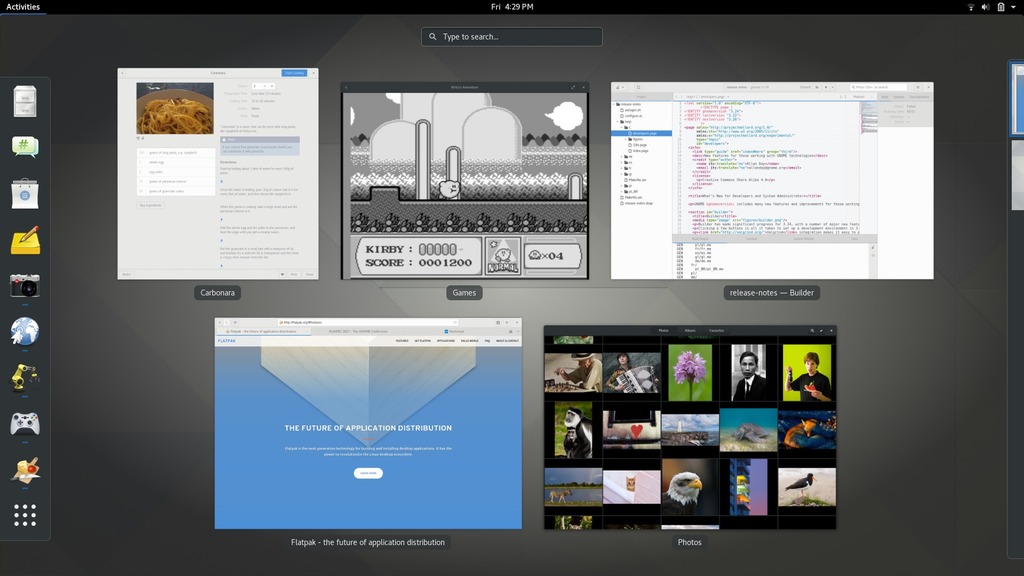
- Activities Overview — a single hot corner or key press reveals open windows, workspaces, and app search.
- Extensions — GNOME’s functionality can be expanded through community-built shell extensions.
- GNOME Circle — a curated set of apps built with GNOME’s design guidelines, ensuring a consistent experience.
- Accessibility — GNOME has strong built-in accessibility support including screen reader integration via Orca.
- Wayland-only — GNOME 50 dropped the native X11 session entirely, and GNOME 51 continues that direction, now also dropping support for legacy NVIDIA driver interfaces in favor of modern, standard graphics APIs. GNOME is fully Wayland-native. Legacy X11 apps still run via XWayland, and other X11 desktop sessions can still be launched from the GDM login screen.
GNOME vs KDE Plasma
Both GNOME and KDE Plasma are mature, full-featured desktop environments, but they reflect different philosophies. GNOME prioritises a clean, minimal interface with sensible defaults. KDE Plasma prioritises customisability and a more traditional desktop layout. Users coming from Windows often find KDE more familiar; those who prefer a focused, distraction-free workflow tend to prefer GNOME.
Who should use GNOME?
GNOME is a strong choice if you want a modern, touch- and gesture-friendly desktop, prefer a curated app ecosystem, or are using a distribution like Fedora or Ubuntu that ships GNOME as its default. It works especially well on high-resolution displays and convertible laptops.
Frequently asked questions
Is GNOME good for beginners?
Yes. GNOME is one of the friendlier desktop environments for Linux newcomers. Its clean interface avoids overwhelming users with options, and distributions like Ubuntu and Fedora ship it with sensible defaults that work well out of the box. The Activities Overview and integrated app search make it easy to find and launch applications without needing to learn keyboard shortcuts.
Is GNOME better than KDE Plasma?
Neither is objectively better — they suit different preferences. GNOME prioritises simplicity and a consistent, opinionated workflow. KDE Plasma prioritises flexibility and a more traditional desktop layout with extensive customisation options. If you want things to just work with minimal tinkering, GNOME is the stronger choice. If you want to tweak every aspect of your desktop, KDE Plasma gives you more room to do that.
Which Linux distributions use GNOME by default?
GNOME is the default desktop in Fedora Linux, Ubuntu, Red Hat Enterprise Linux, Debian (for new installs), and many others. It is also available as an optional desktop in distributions like Arch Linux, openSUSE, and Manjaro.
Does GNOME run on older hardware?
GNOME is more resource-intensive than lightweight alternatives like Xfce or LXQt. A comfortable experience typically requires at least 4 GB of RAM and a GPU with basic hardware acceleration. On older or low-spec machines, a lighter desktop environment may perform better.
| Home Page | https://www.gnome.org/ |
| Page Hit Rank (rank/views) | 1 (44 hits per month) |
| Releases | |
| Distributions with GNOME Desktop Environment |
|
What do you think about GNOME Desktop Environment?