Video annotation: how it differs from image labeling
Video is one of the richest sources of information available to artificial intelligence. Unlike a single image, a video captures movement, interaction, sequence, and change over time. This makes it essential for training AI systems that must understand dynamic environments, from autonomous vehicles navigating busy streets to sports analytics platforms tracking player performance and retail systems analyzing customer behavior. However, preparing video data for machine learning is considerably more complex than labeling static images. Every second of footage may contain dozens of frames, multiple moving objects, and events that unfold gradually. To produce accurate, consistent training data at this scale, many AI teams partner with providers of professional video annotation services. This article explores the unique challenges of video annotation, the main techniques used, and the practices that help deliver reliable results.
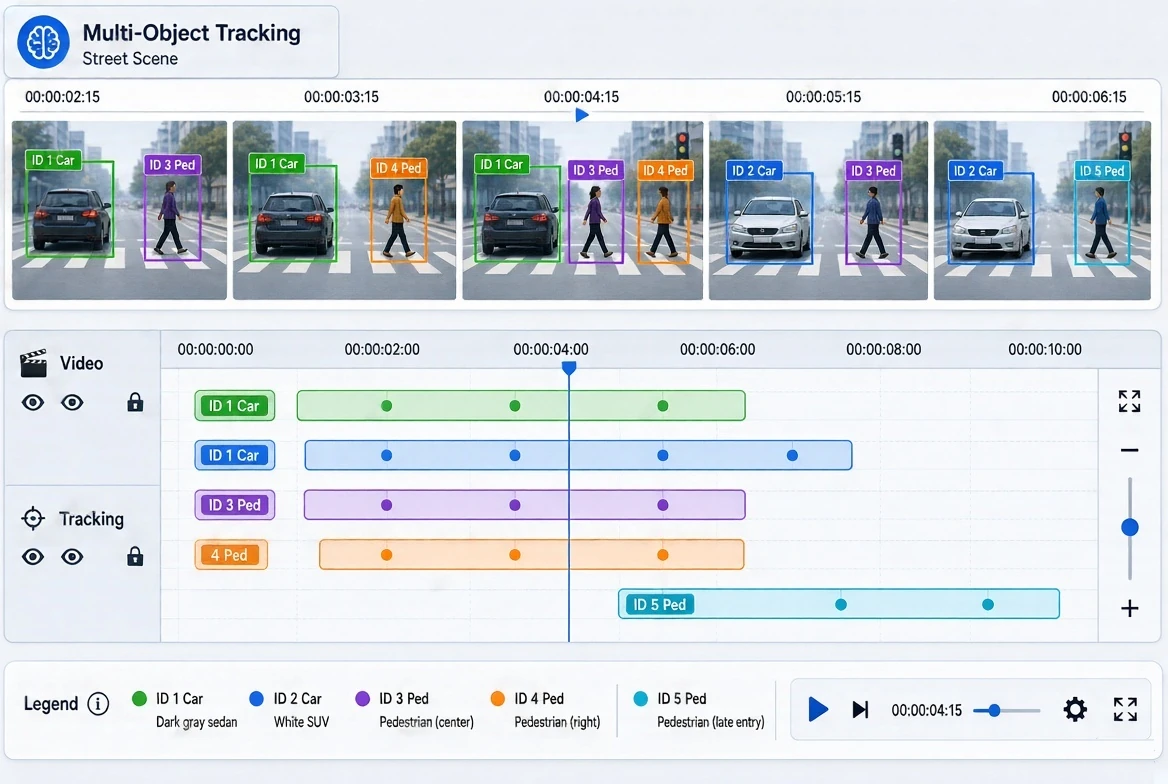
How Video Annotation Differs From Image Annotation
At its core, video annotation involves labeling objects, actions, and events within video footage so that machine learning models can learn to recognize them. While the basic tools may resemble those used for image annotation, the nature of video introduces several important differences.
The Temporal Dimension
Video annotation must account for time. Models often need to understand not only what an object is, but how it moves, how it interacts with other objects, and how events develop from beginning to end. Labels must therefore remain consistent across sequences of frames.
Object Identity Across Frames
When a person, vehicle, or animal appears in a video, it must keep the same unique identifier from the moment it enters the scene until it leaves. Maintaining correct identities becomes challenging when objects cross paths, leave and re-enter the frame, or look similar to one another.
Data Volume
A short video clip can contain thousands of frames. Annotating each frame individually would be extremely time-consuming, so efficient workflows and techniques such as interpolation are essential.
Occlusion and Visibility Changes
Objects may become partially or fully hidden behind other objects, move out of focus, or change in size and orientation. Annotators must follow clear rules for how to label objects in these situations.
Contextual Understanding
Many video annotation tasks involve interpreting behavior, such as whether a person is walking, running, falling, or interacting with a product. These labels require careful judgment and well-defined criteria.
Core Video Annotation Techniques
Different AI applications require different labeling methods. The most widely used techniques include the following.
Object Detection and Tracking
Annotators draw bounding boxes around objects and track them across frames, assigning each object a persistent ID. This technique is fundamental for applications such as traffic monitoring, autonomous driving, and surveillance analytics.
Frame-by-Frame Segmentation
Pixel-level masks are applied to objects or regions in each frame, enabling models to understand precise shapes and boundaries as they change over time. This method is often used in autonomous systems, robotics, and medical video analysis.
Keypoint and Skeleton Tracking
Specific points, such as human joints, are marked and tracked throughout the video. Skeleton tracking supports pose estimation, fitness and rehabilitation applications, sports analytics, and gesture recognition.
Action and Event Recognition
Annotators identify when specific actions or events begin and end, labeling segments of the video with descriptive categories. Examples include detecting a fall, a vehicle making a turn, a customer picking up a product, or a goal being scored.
Polyline and Lane Annotation
Lines are drawn and maintained across frames to mark road lanes, paths, or boundaries, which is particularly important for driver assistance and autonomous navigation systems.
Video Classification
Entire clips or segments are categorized based on their overall content, such as scene type, activity, or relevance for content moderation.
Making Video Annotation Efficient Without Sacrificing Accuracy
Because of the large volume of frames, efficiency is a major concern in video annotation projects. Experienced teams use several approaches to balance speed and precision.
Keyframe annotation and interpolation. Annotators label objects on selected keyframes, and annotation tools calculate object positions in the intermediate frames. Human reviewers then verify and correct interpolated results where movement is irregular.
Pre-annotation with AI models. Existing models can generate initial labels, which human annotators then review and refine. This approach accelerates work, although careful human verification remains essential.
Defined frame sampling. For some tasks, not every frame needs to be annotated. Selecting appropriate sampling rates reduces workload while preserving the information the model needs.
Specialized annotation tools. Platforms built for video, with tracking support, timeline navigation, and ID management, significantly improve both productivity and consistency.
Ensuring Quality in Video Annotation Projects
The temporal and contextual nature of video makes quality control particularly important. Effective projects typically rely on:
- Detailed guidelines that explain how to handle occlusions, object entry and exit, identity changes, and ambiguous actions.
- Consistency checks across frames to detect sudden jumps, missing labels, or incorrect ID assignments.
- Multi-level review, including peer checks and audits by experienced quality specialists.
- Calibration sessions to align annotators on subjective tasks such as action recognition.
- Edge case documentation that grows throughout the project, helping the team handle unusual scenarios consistently.
- Regular feedback from the client’s ML team, ensuring annotations evolve together with model requirements.
Where Video Annotation Drives Real-World AI
Annotated video data supports a wide range of AI solutions:
- Autonomous vehicles and ADAS: tracking vehicles, pedestrians, cyclists, and road features in complex traffic scenarios.
- Retail analytics: analyzing customer movement, product interaction, and checkout behavior.
- Sports technology: tracking players and ball movement, analyzing techniques, and generating performance insights.
- Security and public safety: detecting unusual behavior, intrusions, or incidents in real time.
- Healthcare: analyzing surgical procedures, patient movement, and rehabilitation exercises.
- Manufacturing and logistics: monitoring production processes, worker safety, and warehouse operations.
- Media and content platforms: supporting video search, recommendation systems, and content moderation.
How Mindy Support Provides Video Annotation Services
Mindy Support helps companies prepare high-quality video datasets for computer vision and machine learning projects. The team works with object tracking, frame-by-frame segmentation, keypoint and skeleton annotation, action recognition, polyline annotation, and video classification.
Each engagement starts with a detailed analysis of the client’s use case, footage characteristics, and model requirements. Mindy Support then develops clear annotation guidelines, trains dedicated annotators, and applies structured quality control focused on consistency across frames and accurate object tracking. The team can work in the client’s preferred annotation environment and scale resources according to project volume and deadlines. Regular reporting and close communication with project managers ensure that clients maintain full visibility into progress and quality.
Teaching AI to Understand a World in Motion
As AI systems increasingly operate in dynamic, real-world environments, the ability to interpret movement and change over time becomes essential. Video annotation provides the foundation for this capability, but it requires specialized expertise, efficient workflows, and rigorous attention to consistency.
By working with experienced video annotation professionals, organizations can transform raw footage into reliable training data and build computer vision models that understand not just what they see, but how the world around them moves and evolves.
Comments
Comments are loaded when you choose to open them, which keeps the page faster and lighter.