Linux Lite 8.0 Released with Custom Kernels and GTK4 Apps
Linux Lite 8.0, codenamed Hematite, is the first release in Series 8 and the project’s most ambitious update in its 14-year history. Built on Ubuntu 26.04 LTS (Resolute Raccoon), it introduces a brand-new installer, custom performance kernels, a complete GTK4 application suite, and a new Game Center — all packaged into a leaner 2.36 GB ISO.
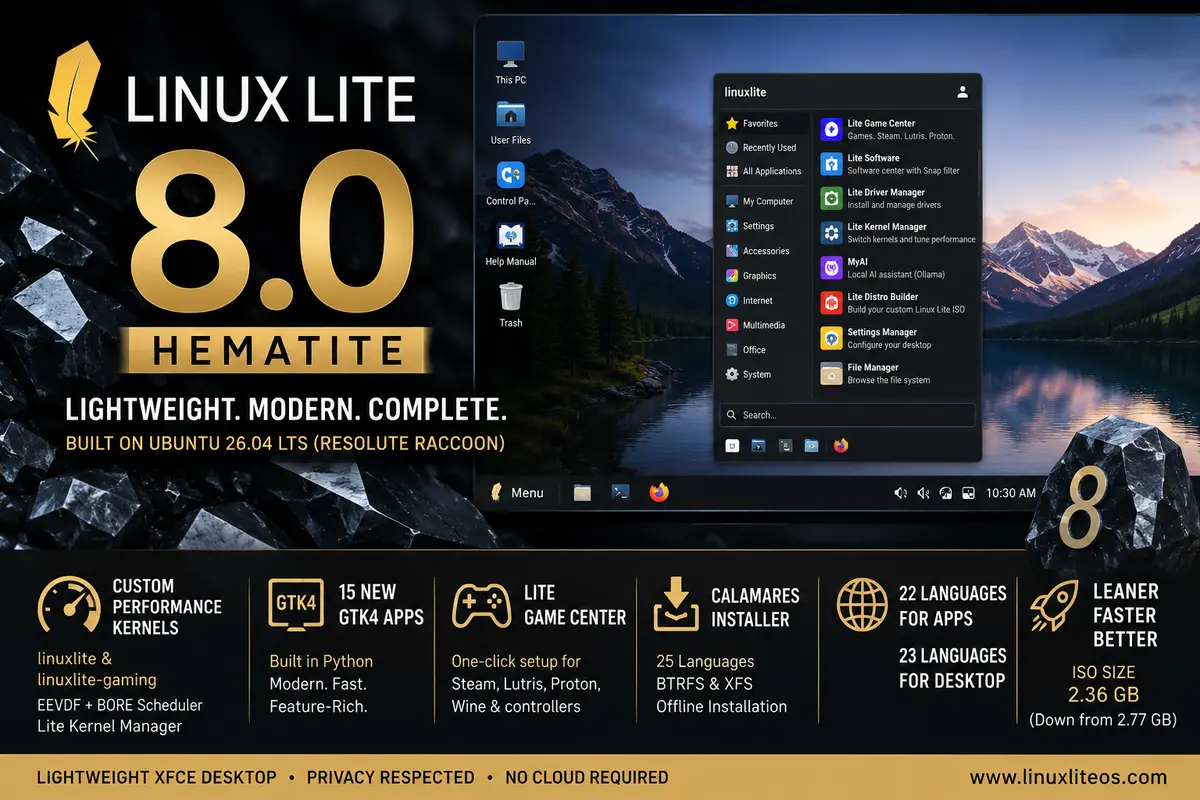
The previous major release, Linux Lite 7.0 “Galena”, was built on Ubuntu 24.04 LTS. Series 8 now moves to Ubuntu 26.04 LTS and represents a near-complete rebuild of the application stack, with 15 new in-house tools written in Python and GTK4.
Custom Performance Kernels
One of the headline features in Linux Lite 8.0 is the Linux Lite Advanced Performance Kernels. Two variants ship with the release:
- linuxlite — the default desktop kernel, tuned for responsive everyday use with dynamic preemption.
- linuxlite-gaming — an optional kernel using full preemption to cut input lag for gaming and audio/video production.
Both kernels use the EEVDF scheduler and include the BORE (Burst-Oriented Response Enhancer) scheduler patch. BORE tracks each task’s burst behaviour and gives a priority boost to short, intense tasks — like a window repaint or a game frame — keeping the desktop snappy under load. A new Lite Kernel Manager application lets users switch kernels, tune sysctl parameters, and submit benchmark scores to a community leaderboard.
New GTK4 Application Suite
All 15 new in-house applications are written in Python and GTK4, replacing their GTK3 predecessors. Notable additions include:
- Lite Game Center — a one-click setup for Steam, Lutris, Proton, Wine, and controller support.
- Lite Driver Manager — a fork of Mint Drivers that detects and installs the right GPU driver in one click.
- Lite Distro Builder — lets users build a custom Linux Lite ISO from a running installation.
- Lite Software — replaces Synaptic Package Manager with a curated catalogue of ~100 applications, including a Snap filter so users know what they are installing.
- MyAI — a fully local, offline AI assistant powered by Ollama, accessible from a Firefox bookmark tab. No cloud account required.
Calamares Replaces Ubiquity
The Ubiquity installer is gone. Linux Lite 8.0 ships Calamares with full OEM support, BTRFS and XFS filesystem options, and slide content translated into 25 languages. Internet access is not required during installation. APT sources are also migrated to the newer DEB822 .sources format.
Other Changes
- Firefox returns as the default browser (self-hosted, no PPA).
- End-to-end GTK4 theming using an Orchis fork named Lite Theme.
- Fastfetch replaces the unmaintained Neofetch; Starship replaces Powerline as the shell prompt.
- ISO size reduced from 2.77 GB to 2.36 GB compared to Series 7.
- All Lite applications translated into 22 languages; desktop translated into 23 languages.
- Python updated to 3.14.4+ (up from 3.12); Btop replaces Htop.
Existing Linux Lite 7.x users can upgrade via Lite Series Upgrade, which provides a full Series 7 to Series 8 upgrade path with a dry-run mode, real-time progress bar, and APT sources backup. The team recommends a full Timeshift backup before upgrading.
Note that Secure Boot is not supported in Series 8. Disable it in firmware before installing.
For the complete changelog, screenshots, and download mirrors, see the official Linux Lite 8.0 release announcement. The ISO is also available via SourceForge.