GhostBSD

GhostBSD is a desktop-oriented operating system designed for ease of use, stability, and a smooth out-of-the-box experience. Built on the robust FreeBSD base, it combines the reliability of BSD systems with a familiar desktop workflow for everyday users.
Unlike many BSD distributions that require manual configuration, GhostBSD focuses on simplicity. It provides a pre-configured system with a graphical interface, making it accessible to users coming from Linux or even Windows environments.
Key Features of GhostBSD
Pre-configured Desktop Experience
GhostBSD ships with the MATE desktop environment, offering a traditional and lightweight interface. The system is ready to use after installation, with minimal setup required.
Based on FreeBSD
At its core, GhostBSD uses FreeBSD, known for its stability, performance, and advanced networking capabilities. This makes it a reliable choice for both desktop and light workstation use.
Simple Software Management
GhostBSD includes an easy-to-use package management system, allowing users to install, update, and remove applications without dealing with complex commands.
Multimedia Support Out-of-the-Box
Essential multimedia codecs are included by default, enabling audio and video playback without additional configuration.
Focus on Stability
GhostBSD prioritizes a stable and consistent experience over frequent updates, making it suitable for users who prefer reliability over cutting-edge changes.
GhostBSD vs FreeBSD
While both share the same base, GhostBSD and FreeBSD target different audiences:
- FreeBSD is designed for advanced users who prefer full control and manual configuration.
- GhostBSD is tailored for desktop users who want a ready-to-use system with minimal setup.
GhostBSD simplifies many aspects of FreeBSD, including hardware configuration, desktop setup, and package management.
Who Should Use GhostBSD?
GhostBSD is suitable for:
- Users looking for a stable alternative to Linux distributions
- Beginners interested in BSD without a steep learning curve
- Developers who prefer a clean and predictable environment
- Users who want a lightweight desktop system with minimal maintenance
It may not be ideal for users who require the latest software versions or extensive hardware compatibility found in some Linux distributions.
Historical Background
Between 2018 and 2020, GhostBSD briefly adopted TrueOS as its base to enhance desktop usability. After the discontinuation of TrueOS, the project returned to a FreeBSD base, ensuring long-term stability and continued development.
This transition helped GhostBSD maintain a balance between user-friendliness and a solid BSD foundation.
Frequently Asked Questions (FAQ)
What is GhostBSD?
GhostBSD is a user-friendly desktop operating system based on FreeBSD. It is designed to provide a simple and ready-to-use BSD experience with a graphical interface.
Is GhostBSD good for beginners?
Yes. GhostBSD is one of the most beginner-friendly BSD distributions, as it comes pre-configured with a desktop environment and essential tools.
What desktop environment does GhostBSD use?
GhostBSD primarily uses the MATE desktop environment, which is lightweight and easy to navigate.
Is GhostBSD better than FreeBSD?
It depends on the use case. GhostBSD is better suited for desktop users, while FreeBSD is more flexible and powerful for advanced users and server environments.
Can GhostBSD run Linux applications?
GhostBSD has limited compatibility with Linux applications through compatibility layers, but it is not as seamless as native Linux distributions.
Is GhostBSD actively maintained?
Yes. GhostBSD is actively maintained and continues to receive updates based on FreeBSD releases.
What makes GhostBSD different from Linux distributions?
GhostBSD is based on BSD, not Linux. This means differences in system design, licensing, and package management, although the user experience can feel similar.
Is GhostBSD suitable for daily use?
Yes. GhostBSD can be used for everyday tasks such as browsing, development, and media consumption, provided hardware compatibility is met.
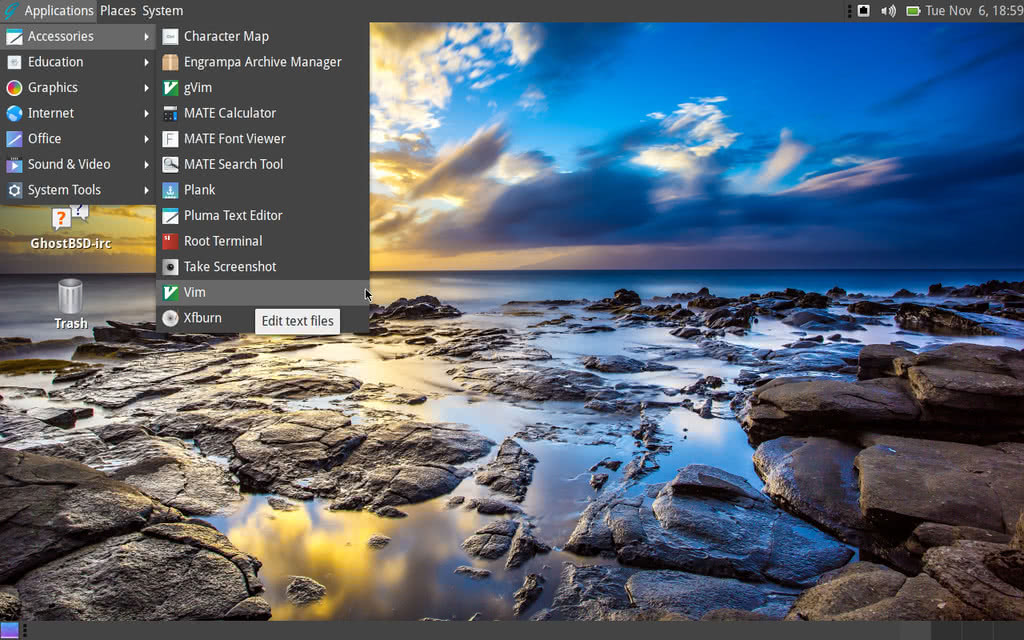 GhostBSD MATE desktop screenshot
 | Type | BSD |
| Status | Active |
| Home Page | https://www.ghostbsd.org/ |
| News and Updates | https://www.ghostbsd.org/news |
| Page popularity | 32(12 hits per month) |
| Base distributions | |
| Desktop Environments | |
| Releases | |
| Telegram Channel(s) |
Other stories on GhostBSD
- GhostBSD is switching base system from FreeBSD to TrueOS
- GhostBSD 26.1 Released with FreeBSD 15.0, XLibre, and Zsh
- GhostBSD 24.07.1 Release: New Features, Enhancements, and Changes
- GhostBSD 24.04.1 Released: Enhancing Stability and Performance
- GhostBSD 24.01.1 has been released with FreeBSD 14.0-STABLE base
- GhostBSD 23.10.1 released
- GhostBSD 22.01.12 ISO released
- GhostBSD 21.11.24 released
- GhostBSD 21.09.06 ISO images are available now
- GhostBSD 20.04 released
- GhostBSD 20.01 released
- GhostBSD 19.10 released with UEFI boot improvements
- GhostBSD 19.09 released with TrueOS STABLE base
- GhostBSD 18.10 released with the TrueOS base
- GhostBSD 18.10 RC1 released with TrueOS base
What do you think about GhostBSD?