Void Linux

Void Linux at a glance
- Status
- Active
- Type
- Linux
- Popularity
- Not ranked
- Derivatives
- 2 distributions
- Based on
-
- Independent
- Desktop environments
Void Linux is an independent, general-purpose Linux distribution developed entirely by volunteers. It is not a fork of Debian, Arch or any other project: Void’s package manager, build system and package collection were written from scratch. It follows a rolling-release model, uses runit instead of systemd, and is one of the few distributions that offers both glibc and musl builds as first-class options.
Void appeals to experienced Linux users who want a fast, minimal and predictable system that they assemble themselves, much like Arch Linux users do, but with a different set of design choices.
Key features of Void Linux
- Independent base: no upstream distribution to inherit decisions or delays from. Packages come from the project’s own
void-packagesrepository. - Stable rolling release: there are no version upgrades to perform. Void describes its focus as “stability over bleeding-edge”, so updates arrive continuously but new versions are not rushed in.
- XBPS package manager: a fast binary package manager released under the 2-clause BSD license.
- runit init system: a small, simple init and service supervisor that boots quickly and is easy to understand.
- glibc and musl: choose the C library at install time.
- Continuous build system: software is built into binary packages as soon as changes are pushed to
void-packages. You can follow progress on the public build server. - Broad hardware support: images for x86_64, i686, aarch64, armv7l and armv6l, including single-board computers such as the Raspberry Pi.
XBPS: the X Binary Package System
XBPS is Void’s native package manager. It is split into small single-purpose commands:
| Task | Command |
|---|---|
| Update the whole system | xbps-install -Su |
| Install a package | xbps-install <package> |
| Search repositories | xbps-query -Rs <keyword> |
| Remove a package and its orphaned dependencies | xbps-remove -R <package> |
| Reconfigure a package | xbps-reconfigure <package> |
| Switch between alternative providers | xbps-alternatives |
Before applying updates, XBPS checks that shared libraries are not replaced with incompatible versions, which protects the system from partial breakage, a common concern on rolling-release distributions. When XBPS itself has an update, it is installed in a separate transaction first.
The companion xtools package adds helpers such as xlocate (find which package ships a file) and xcheckrestart (find processes still using outdated libraries).
Building packages with xbps-src
Package templates live in the void-packages Git repository. Its xbps-src tool builds software in containers created with Linux namespaces and needs no root access. It can also cross-compile for other architectures. This is how users build “restricted” packages that Void cannot redistribute in binary form, by setting XBPS_ALLOW_RESTRICTED=yes in the build configuration.
runit: Void’s init system
Void moved from systemd to runit in 2014. runit starts the system and supervises services, restarting them if they crash. Managing services is done with plain symlinks:
# Enable a service
ln -s /etc/sv/sshd /var/service/

# Check, restart or stop it
sv status sshd
sv restart sshd

# Disable it
rm /var/service/sshd
This approach suits users who prefer readable shell scripts and a small amount of moving parts. If you rely on software that requires systemd, such as some GNOME features or systemd-specific tooling, check that it works under runit before switching.
glibc vs musl: choosing a C library
Void offers both C library implementations on every architecture except i686, which is glibc-only.
- glibc is the standard choice. It runs proprietary and binary-only software such as the NVIDIA driver, Steam and many commercial applications.
- musl is a lighter, stricter C library. Void patches packages that are incompatible with it and sends fixes upstream. The trade-off is compatibility: the proprietary NVIDIA driver does not support musl, and there is no multilib repository. Glibc-only programs can still run inside a glibc chroot or a Flatpak.
If you are unsure, choose glibc.
Repositories: main, nonfree, multilib and debug
Only the main repository is enabled after installation. Optional sub-repositories are enabled by installing a small package:
| Repository | Enable with | Purpose |
|---|---|---|
| nonfree | void-repo-nonfree | Proprietary software and firmware |
| multilib | void-repo-multilib | 32-bit libraries on x86_64 glibc (needed for Steam and Wine) |
| multilib/nonfree | void-repo-multilib-nonfree | 32-bit proprietary libraries |
| debug | void-repo-debug | Debug symbols (<package>-dbg) |
Installing Void Linux
Void publishes live images in two flavors:
- base: a minimal console image. Install it and add only the desktop or window manager you want.
- xfce: a graphical live session with the Xfce desktop.
Download the current images from the official download page. Each release ships a sha256sum.txt file signed with minisign, so you can verify the ISO before writing it to a USB drive. Boot the live image, log in, and run void-installer as root to start the text-based installer, which guides you through keyboard, network, partitioning, bootloader and user setup.
Void does not use a graphical installer, and a base install leaves desktop setup to you. Beyond Xfce, the repositories include GNOME, KDE Plasma, MATE, Cinnamon, LXQt, Enlightenment and many window managers. The Void Handbook covers manual installation, full-disk encryption and ZFS-on-root setups.
Who should use Void Linux?
- Experienced users who want to build a system from a minimal base and understand every component.
- People avoiding systemd who still want a large, current package collection. Compare it with Devuan if you prefer a Debian-style stable release.
- musl and embedded enthusiasts who want a well-maintained musl distribution with desktop packages.
- ARM and older x86 hardware owners, thanks to aarch64, ARMv6/v7 and i686 images.
Void is less suitable if you want a graphical installer and a preconfigured desktop out of the box. In that case, consider a Void-based option such as Peppermint OS’s Void edition, or a beginner-friendly distribution such as Linux Mint.
Distributions based on Void Linux
Void’s independent base has attracted other projects. Peppermint OS added a rolling Void edition in November 2026 alongside its Debian and Devuan editions, and Project Trident moved from TrueOS to Void in 2019.
History of Void Linux
Void was started by Juan Romero Pardines, a former NetBSD developer, as a testbed for the XBPS package manager. The first Git import of void-packages dates from September 2008. Notable milestones:
- 2014: Void replaced systemd with runit and began switching from OpenSSL to LibreSSL.
- 2018: after the founder became unreachable, the remaining team took over the project’s infrastructure and continued development as a community effort.
- 2021: Void began switching back from LibreSSL to OpenSSL.
Void Linux community and support
- Void Handbook: official documentation
- Package search and manual pages
- IRC:
#voidlinuxon Libera.Chat - r/voidlinux on Reddit and Mastodon
- Source code on GitHub
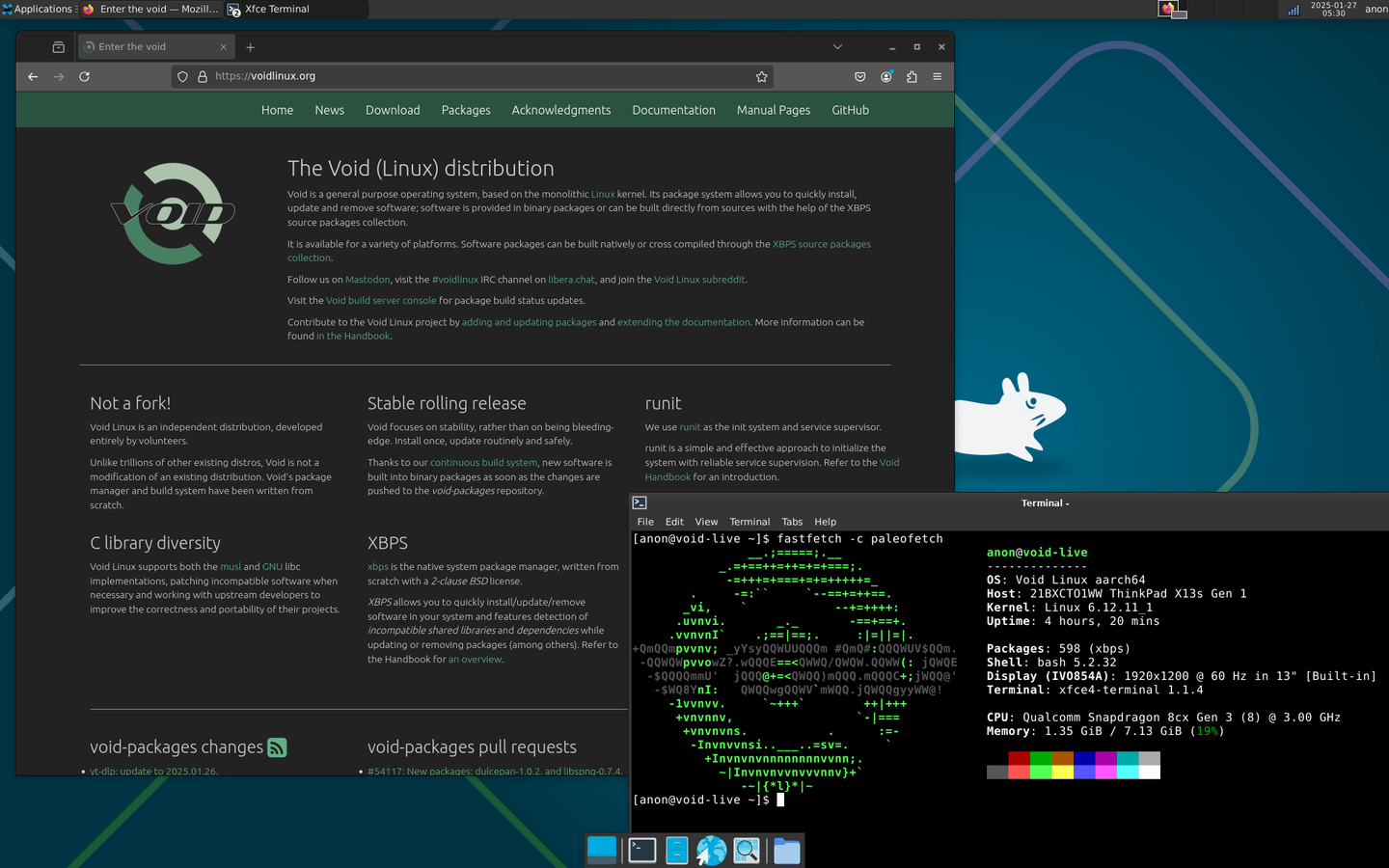 Void Linux Xfce live image running on an aarch64 ThinkPad X13s (official screenshot)
| Distributions based on Void Linux |
Other stories on Void Linux
Frequently asked questions on Void Linux
-
Is Void Linux based on another distribution?
No. Void is an independent distribution, not a fork. Its package manager (XBPS) and build system (xbps-src) were written from scratch, and its packages are built from the project's own void-packages repository.
-
Does Void Linux use systemd?
No. Void switched from systemd to runit in 2014. Services are enabled by symlinking a directory from /etc/sv into /var/service and controlled with the sv command.
-
Should I choose the glibc or musl version of Void Linux?
Choose glibc for the widest software compatibility, including proprietary programs such as the NVIDIA driver and Steam. Choose musl if you want a smaller, stricter C library and mainly use free software; there is no multilib repository for musl, and glibc-only programs need a glibc chroot or container.
-
Is Void Linux stable enough for daily use?
Yes, for users comfortable with a hands-on system. Void is a rolling release, but the project states that it focuses on stability over bleeding-edge versions, and XBPS checks that updates do not break shared library dependencies.
-
How do I update Void Linux?
Run 'xbps-install -Su' as root. If XBPS itself has an update, it is installed in a separate transaction first, so you may need to run the command twice.
-
How do I install proprietary software like the NVIDIA driver on Void?
Enable the nonfree repository by installing the void-repo-nonfree package, then install the driver with xbps-install. 32-bit libraries for Steam and Wine need the multilib repositories (void-repo-multilib and void-repo-multilib-nonfree), which exist only for x86_64 glibc.
Last updated: November 26, 2026
What do you think about Void Linux?