LXQt Desktop Environment

LXQt is a lightweight desktop environment built with the Qt toolkit. It is designed for users who want a fast, simple, and traditional desktop without the heavier resource usage of larger desktop environments.
What is LXQt?
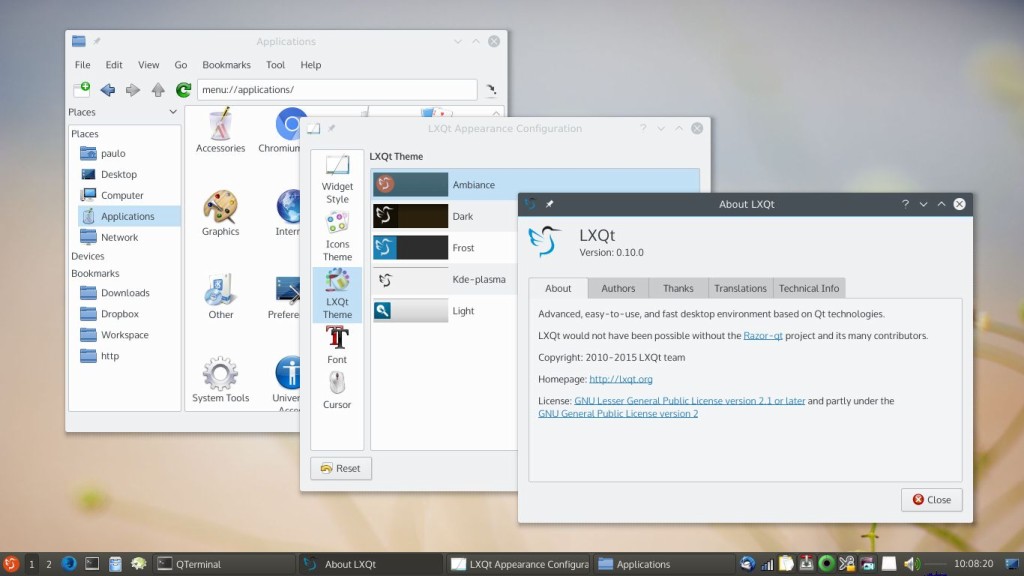
LXQt focuses on delivering a familiar desktop layout with a panel, application menu, file manager, system tray, and desktop session tools. It aims to stay responsive on both older computers and modern low-power systems while still offering a clean and practical user experience.
Because it is based on Qt, LXQt can feel like a natural fit for users who prefer Qt-based applications. At the same time, it avoids the extra visual and background overhead often associated with more feature-heavy desktop environments.
Why choose LXQt?
The main reason to choose LXQt is efficiency. It is widely used by people who want:
- a lightweight Linux desktop environment
- good performance on older hardware
- a traditional desktop workflow
- a simple interface without unnecessary effects
- a flexible base for custom setups
LXQt is often a good option for older laptops, entry-level PCs, virtual machines, and users who want a fast desktop that stays out of the way.
Key features of LXQt
LXQt includes the core parts most users expect from a modern desktop environment:
- panel with menu, task manager, and system tray
- session management tools
- file manager integration
- configurable appearance and behavior
- support for multiple window managers
- low memory and CPU usage compared with heavier desktop choices
Its modular design also makes it easier for users and distributions to combine LXQt with different components depending on their goals.
LXQt user experience
LXQt is best suited for people who prefer function over visual effects. It does not try to look flashy by default. Instead, it prioritizes speed, responsiveness, and clarity.
Users coming from Windows, Xfce, MATE, or other classic desktop layouts may find LXQt easier to understand than more experimental interfaces. The learning curve is low, and the desktop stays predictable for everyday tasks such as browsing, file management, media playback, and office work.
LXQt vs heavier desktop environments
Compared with desktop environments such as KDE Plasma or GNOME, LXQt generally places less demand on system resources. That makes it attractive for lightweight Linux installations and for systems where performance matters more than advanced visual integration.
Compared with Xfce, LXQt offers a similar goal of keeping the desktop fast and practical, but it is built on Qt rather than GTK. For some users, that toolkit difference may influence app integration, theme consistency, or personal preference.
Who should use LXQt?
LXQt is a strong choice for:
- users with older or low-spec hardware
- people who want a fast desktop for daily use
- minimalists who prefer a classic interface
- Linux users setting up lightweight systems
- virtual machine and lab environments where performance matters
It may be less appealing to users who want heavy visual polish, deep built-in effects, or a highly integrated feature set out of the box.
Final thoughts
LXQt remains one of the most practical lightweight desktop environments available for Linux and other POSIX-compatible systems. It combines a traditional desktop layout with low resource usage, making it a good fit for users who value speed, simplicity, and control.
For anyone looking for a lightweight Qt-based desktop environment that stays fast and usable without unnecessary complexity, LXQt is well worth considering.
| Home Page | https://lxqt-project.org/ |
| Page Hit Rank (rank/views) | 4 (17 hits per month) |
| Releases | |
| Distributions with LXQt Desktop Environment |
What do you think about LXQt Desktop Environment?